QR Codes for Meters
QR codes provide quick access to a meter in the mobile app. Scanning a QR code opens the corresponding meter, allowing the user to easily enter a reading.
QR codes are intended primarily for physical meters with manual readings. The code can be printed, attached to the meter, and then used during regular meter readings.
Creating QR Codes
QR codes can be created in two ways.
Bulk Creation of QR Codes
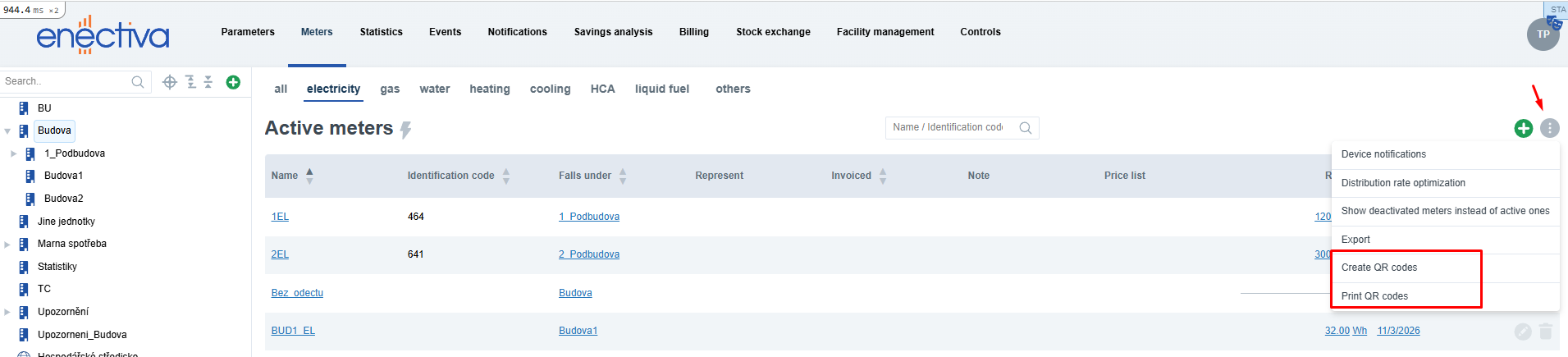
- Open the Meters tab
- Click the three-dot menu in the top right corner
- Select Create QR Codes
- Select the meters for which you want to create QR codes
- Click Save
QR codes can only be created for reading meters that do not yet have a QR code.
Creating a QR Code from Meter Detail
- Open the detail of a specific meter
- Go to the QR Code tab
- Click Create QR Code
Once created, the QR code is displayed directly on the meter.

Printing QR Codes
QR codes can be printed to a PDF file.
- Open the Meters tab
- Click the three-dot menu in the top right corner
- Select Print QR Codes
- Select the meters whose QR codes you want to print
- Enter a name for the PDF
- Click Save
Once created, the PDF appears in the Existing PDFs list.

Downloading or Deleting a PDF
On the Print QR Codes page you can manage previously created PDF files.
For each PDF, the following options are available:
- Download PDF
- Delete PDF
Deleting a PDF only removes the generated PDF file. The QR codes assigned to the meters remain intact.

PDF Content
The generated PDF contains QR codes ready to be printed and attached to physical meters.
Each QR code may also display additional context:
- Name of the parent entity
- Name of the entity
- Name of the meter
This description helps with orientation and makes it easier to attach the QR code to the correct meter.
Using QR Codes in the Mobile App
After attaching the QR code to a meter, the user can scan it in the mobile app.
Scanning the code opens the corresponding meter, allowing the user to quickly enter a new reading.
Notes
- A QR code can only be assigned to one meter
- A meter can have only one QR code
- QR codes cannot be deleted
- Only PDF files created for printing can be deleted
- QR codes are intended for meters with manual readings and no automatic data import