Degree days as divisor with area-based weighting
Reports support using degree days (HDD/CDD) as a divisor to calculate specific consumption.
To ensure fair comparison between entities, a weighting factor is applied, which can be:
- building area (IA = Individual Area)
- aggregated area (AA = Aggregated Area, e.g. GFA)
This logic is equivalent to weighting based on object properties.
How It Works
When using degree days as a divisor:
- The system does not simply calculate consumption / HDD or CDD
- HDD or CDD are weighted based on the area of each entity
- A weighted average of degree days is calculated
- The total consumption is divided by this weighted value
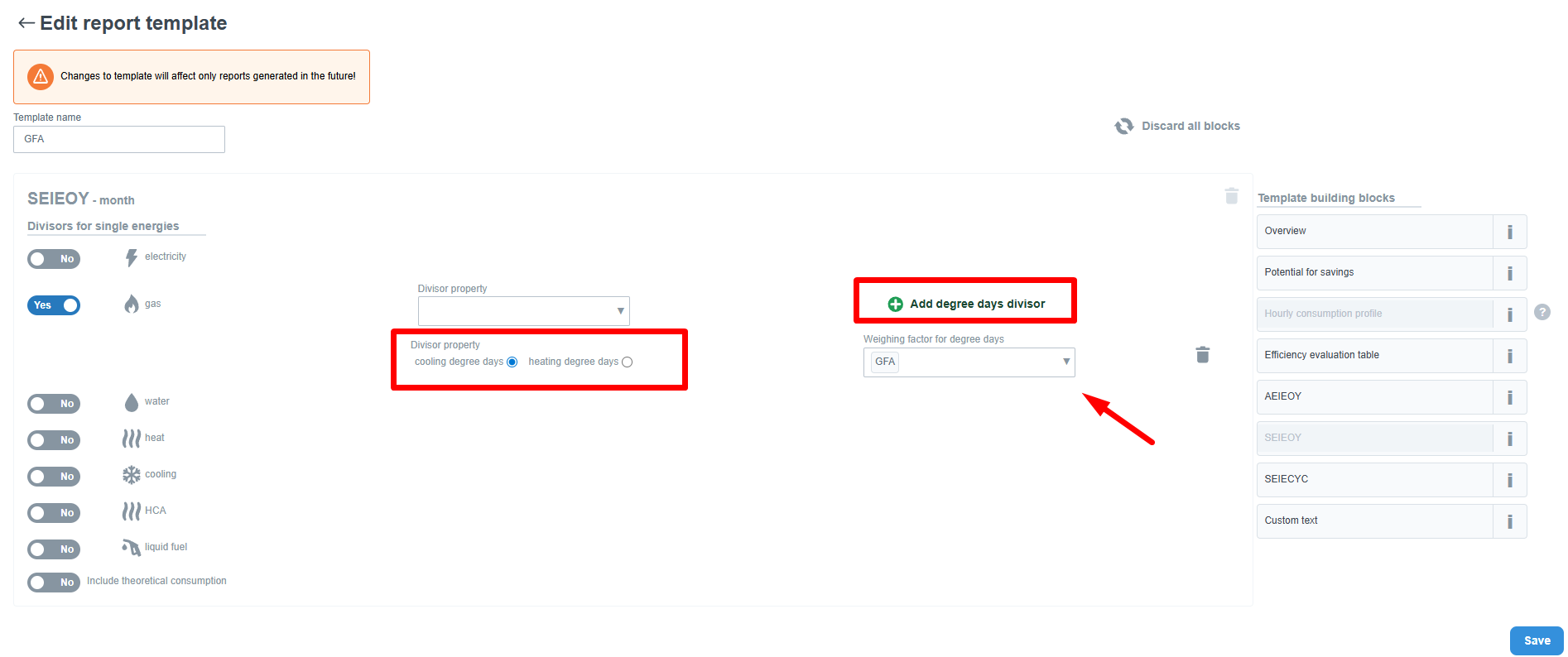
Template Configuration
To generate the report, the template must be configured correctly:
- Select the desired energy (e.g. gas)
- Enable “Add degree days divisor”
- Select the degree day type:
- Cooling degree days (CDD)
- Heating degree days (HDD)
- Choose the weighting factor (e.g. GFA)
Specific Consumption Calculation for Multiple Entities
If the report includes multiple entities (portfolio, site, group of buildings),
you cannot just sum or average HDD – different-sized entities affect consumption differently.
Therefore, the system uses area-based weighting:
- Each entity contributes proportionally to its area
- Larger entities have greater influence on the result
- Area does not appear in the final unit – it serves only as a weight
For a single entity, the calculation is simple:
consumption / HDD
For multiple entities:
Specific consumption = total consumption / weighted HDD (by area)
Calculation Principle
- Calculate the weighted average HDD based on areas
- Sum the total consumption of all entities
- Divide total consumption by the weighted HDD
Example – Step by Step
We have two buildings:
Building A
- Consumption: 500 m³
- Area: 10 m²
- HDD: 41
Building B
- Consumption: 459.53 m³
- Area: 1000 m²
- HDD: 58
Step 1 – Weighted HDD by Area
(41 × 10 + 58 × 1000) / (10 + 1000)
= (410 + 58,000) / 1010
= 58,410 / 1010
Weighted HDD = 57.83
Step 2 – Total Consumption
500 + 459.53 = 959.53 m³
Total consumption = 959.53 m³
Step 3 – Specific Consumption
959.53 / 57.83 = 16.59 m³ / HDD
Specific portfolio consumption = 16.59 m³ / HDD
Result
✅ Specific consumption of the portfolio = 16.59 m³ / HDD
Summary
- HDD are not summed when aggregating
- HDD are weighted by entity area
- The result simulates a single large entity composed of multiple smaller ones