Degree Days
Degree days indicate the impact of outdoor temperature on a building's heating and cooling demand.
There are two types of degree days:
- HDD (Heating Degree Days) – indicate heating demand.
- CDD (Cooling Degree Days) – indicate cooling demand.
Degree Day Data Series
The following degree day data series are available in the application.
-
Data series containing HDD/CDD values:
- Degree days (heating)
- Degree days (cooling)
-
Data series with automatic HDD/CDD calculation from outdoor temperature:
- Degree days (heating) from outdoor temperature
- Degree days (cooling) from outdoor temperature
Degree Days Calculated from Outdoor Temperature
When creating this data series, you must configure the threshold temperature and target temperature, select an outdoor temperature data series, and choose the objects to which the data series will be assigned.
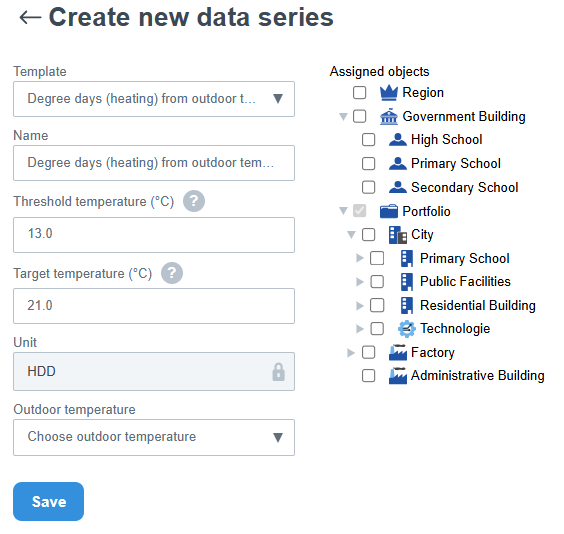
- Threshold Temperature – defines the temperature threshold above which (CDD) or below which (HDD) degree days begin to be calculated.
- Target Temperature – the temperature against which the resulting degree day value is calculated. Unlike the threshold temperature, it does not determine when degree days begin to be calculated, but serves as the reference value used in the calculation.
- Outdoor Temperature – the data series containing the outdoor temperature values used for degree day calculations.
When editing the data series, the threshold and target temperatures are displayed below the Save button. Their values can be modified by clicking the Edit icon.
HDD Calculation Example
Assume that the target indoor temperature is 22 °C. The outdoor temperature is 10 °C, and the heating threshold temperature is set to 18 °C.
- Threshold Temperature: 18 °C
- Target Temperature: 22 °C
- Outdoor Temperature: 10 °C
Since the outdoor temperature has fallen below the configured threshold temperature, heating degree days are calculated: HDD = Target Temperature − Outdoor Temperature
In this example: HDD = 22 − 10 = 12
If the outdoor temperature were 18 °C or higher, the HDD value would be 0 because it is not below the configured threshold temperature.
CDD Calculation Example
Consider a building that requires cooling during the summer months. The target temperature is set to 22 °C, while the outdoor temperature reaches 30 °C. The cooling threshold temperature is set to 24 °C.
- Threshold Temperature: 24 °C
- Target Temperature: 22 °C
- Outdoor Temperature: 30 °C
Since the outdoor temperature has exceeded the configured threshold temperature, cooling degree days are calculated: CDD = Outdoor Temperature − Target Temperature
In this example: CDD = 30 − 22 = 8
If the outdoor temperature were 24 °C or lower, the CDD value would be 0 because it does not exceed the configured threshold temperature.
⚠️ An outdoor temperature data series cannot be deleted if it is being used for degree day calculations.